
584 lines
27 KiB
Markdown
584 lines
27 KiB
Markdown
# 16 | 用好Java 8的日期时间类,少踩一些“老三样”的坑
|
||
|
||
你好,我是朱晔。今天,我来和你说说恼人的时间错乱问题。
|
||
|
||
在Java 8之前,我们处理日期时间需求时,使用Date、Calender和SimpleDateFormat,来声明时间戳、使用日历处理日期和格式化解析日期时间。但是,这些类的API的缺点比较明显,比如可读性差、易用性差、使用起来冗余繁琐,还有线程安全问题。
|
||
|
||
因此,Java 8推出了新的日期时间类。每一个类功能明确清晰、类之间协作简单、API定义清晰不踩坑,API功能强大无需借助外部工具类即可完成操作,并且线程安全。
|
||
|
||
但是,Java 8刚推出的时候,诸如序列化、数据访问等类库都还不支持Java 8的日期时间类型,需要在新老类中来回转换。比如,在业务逻辑层使用LocalDateTime,存入数据库或者返回前端的时候还要切换回Date。因此,很多同学还是选择使用老的日期时间类。
|
||
|
||
现在几年时间过去了,几乎所有的类库都支持了新日期时间类型,使用起来也不会有来回切换等问题了。但,很多代码中因为还是用的遗留的日期时间类,因此出现了很多时间错乱的错误实践。比如,试图通过随意修改时区,使读取到的数据匹配当前时钟;再比如,试图直接对读取到的数据做加、减几个小时的操作,来“修正数据”。
|
||
|
||
今天,我就重点与你分析下时间错乱问题背后的原因,看看使用遗留的日期时间类,来处理日期时间初始化、格式化、解析、计算等可能会遇到的问题,以及如何使用新日期时间类来解决。
|
||
|
||
## 初始化日期时间
|
||
|
||
我们先从日期时间的初始化看起。如果要初始化一个2019年12月31日11点12分13秒这样的时间,可以使用下面的两行代码吗?
|
||
|
||
```
|
||
Date date = new Date(2019, 12, 31, 11, 12, 13);
|
||
System.out.println(date);
|
||
|
||
```
|
||
|
||
可以看到,输出的时间是3029年1月31日11点12分13秒:
|
||
|
||
```
|
||
Sat Jan 31 11:12:13 CST 3920
|
||
|
||
```
|
||
|
||
相信看到这里,你会说这是新手才会犯的低级错误:年应该是和1900的差值,月应该是从0到11而不是从1到12。
|
||
|
||
```
|
||
Date date = new Date(2019 - 1900, 11, 31, 11, 12, 13);
|
||
|
||
```
|
||
|
||
你说的没错,但更重要的问题是,当有国际化需求时,需要使用Calendar类来初始化时间。
|
||
|
||
使用Calendar改造之后,初始化时年参数直接使用当前年即可,不过月需要注意是从0到11。当然,你也可以直接使用Calendar.DECEMBER来初始化月份,更不容易犯错。为了说明时区的问题,我分别使用当前时区和纽约时区初始化了两次相同的日期:
|
||
|
||
```
|
||
Calendar calendar = Calendar.getInstance();
|
||
calendar.set(2019, 11, 31, 11, 12, 13);
|
||
System.out.println(calendar.getTime());
|
||
Calendar calendar2 = Calendar.getInstance(TimeZone.getTimeZone("America/New_York"));
|
||
calendar2.set(2019, Calendar.DECEMBER, 31, 11, 12, 13);
|
||
System.out.println(calendar2.getTime());
|
||
|
||
```
|
||
|
||
输出显示了两个时间,说明时区产生了作用。但,我们更习惯年/月/日 时:分:秒这样的日期时间格式,对现在输出的日期格式还不满意:
|
||
|
||
```
|
||
Tue Dec 31 11:12:13 CST 2019
|
||
Wed Jan 01 00:12:13 CST 2020
|
||
|
||
```
|
||
|
||
那,时区的问题是怎么回事,又怎么格式化需要输出的日期时间呢?接下来,我就与你逐一分析下这两个问题。
|
||
|
||
## “恼人”的时区问题
|
||
|
||
我们知道,全球有24个时区,同一个时刻不同时区(比如中国上海和美国纽约)的时间是不一样的。对于需要全球化的项目,如果初始化时间时没有提供时区,那就不是一个真正意义上的时间,只能认为是我看到的当前时间的一个表示。
|
||
|
||
关于Date类,我们要有两点认识:
|
||
|
||
* 一是,Date并无时区问题,世界上任何一台计算机使用new Date()初始化得到的时间都一样。因为,Date中保存的是UTC时间,UTC是以原子钟为基础的统一时间,不以太阳参照计时,并无时区划分。
|
||
* 二是,Date中保存的是一个时间戳,代表的是从1970年1月1日0点(Epoch时间)到现在的毫秒数。尝试输出Date(0):
|
||
|
||
```
|
||
System.out.println(new Date(0));
|
||
System.out.println(TimeZone.getDefault().getID() + ":" + TimeZone.getDefault().getRawOffset()/3600000);
|
||
|
||
```
|
||
|
||
我得到的是1970年1月1日8点。因为我机器当前的时区是中国上海,相比UTC时差+8小时:
|
||
|
||
```
|
||
Thu Jan 01 08:00:00 CST 1970
|
||
Asia/Shanghai:8
|
||
|
||
```
|
||
|
||
对于国际化(世界各国的人都在使用)的项目,处理好时间和时区问题首先就是要正确保存日期时间。这里有两种保存方式:
|
||
|
||
* 方式一,以UTC保存,保存的时间没有时区属性,是不涉及时区时间差问题的世界统一时间。我们通常说的时间戳,或Java中的Date类就是用的这种方式,这也是推荐的方式。
|
||
* 方式二,以字面量保存,比如年/月/日 时:分:秒,一定要同时保存时区信息。只有有了时区信息,我们才能知道这个字面量时间真正的时间点,否则它只是一个给人看的时间表示,只在当前时区有意义。Calendar是有时区概念的,所以我们通过不同的时区初始化Calendar,得到了不同的时间。
|
||
|
||
正确保存日期时间之后,就是正确展示,即我们要使用正确的时区,把时间点展示为符合当前时区的时间表示。到这里,我们就能理解为什么会有所谓的“时间错乱”问题了。接下来,我再通过实际案例分析一下,从字面量解析成时间和从时间格式化为字面量这两类问题。
|
||
|
||
**第一类是**,对于同一个时间表示,比如2020-01-02 22:00:00,不同时区的人转换成Date会得到不同的时间(时间戳):
|
||
|
||
```
|
||
String stringDate = "2020-01-02 22:00:00";
|
||
SimpleDateFormat inputFormat = new SimpleDateFormat("yyyy-MM-dd HH:mm:ss");
|
||
//默认时区解析时间表示
|
||
Date date1 = inputFormat.parse(stringDate);
|
||
System.out.println(date1 + ":" + date1.getTime());
|
||
//纽约时区解析时间表示
|
||
inputFormat.setTimeZone(TimeZone.getTimeZone("America/New_York"));
|
||
Date date2 = inputFormat.parse(stringDate);
|
||
System.out.println(date2 + ":" + date2.getTime());
|
||
|
||
```
|
||
|
||
可以看到,把2020-01-02 22:00:00这样的时间表示,对于当前的上海时区和纽约时区,转化为UTC时间戳是不同的时间:
|
||
|
||
```
|
||
Thu Jan 02 22:00:00 CST 2020:1577973600000
|
||
Fri Jan 03 11:00:00 CST 2020:1578020400000
|
||
|
||
```
|
||
|
||
这正是UTC的意义,并不是时间错乱。对于同一个本地时间的表示,不同时区的人解析得到的UTC时间一定是不同的,反过来不同的本地时间可能对应同一个UTC。
|
||
|
||
**第二类问题是**,格式化后出现的错乱,即同一个Date,在不同的时区下格式化得到不同的时间表示。比如,在我的当前时区和纽约时区格式化2020-01-02 22:00:00:
|
||
|
||
```
|
||
String stringDate = "2020-01-02 22:00:00";
|
||
SimpleDateFormat inputFormat = new SimpleDateFormat("yyyy-MM-dd HH:mm:ss");
|
||
//同一Date
|
||
Date date = inputFormat.parse(stringDate);
|
||
//默认时区格式化输出:
|
||
System.out.println(new SimpleDateFormat("[yyyy-MM-dd HH:mm:ss Z]").format(date));
|
||
//纽约时区格式化输出
|
||
TimeZone.setDefault(TimeZone.getTimeZone("America/New_York"));
|
||
System.out.println(new SimpleDateFormat("[yyyy-MM-dd HH:mm:ss Z]").format(date));
|
||
|
||
```
|
||
|
||
输出如下,我当前时区的Offset(时差)是+8小时,对于-5小时的纽约,晚上10点对应早上9点:
|
||
|
||
```
|
||
[2020-01-02 22:00:00 +0800]
|
||
[2020-01-02 09:00:00 -0500]
|
||
|
||
```
|
||
|
||
因此,有些时候数据库中相同的时间,由于服务器的时区设置不同,读取到的时间表示不同。这,不是时间错乱,正是时区发挥了作用,因为UTC时间需要根据当前时区解析为正确的本地时间。
|
||
|
||
所以,**要正确处理时区,在于存进去和读出来两方面**:存的时候,需要使用正确的当前时区来保存,这样UTC时间才会正确;读的时候,也只有正确设置本地时区,才能把UTC时间转换为正确的当地时间。
|
||
|
||
Java 8推出了新的时间日期类ZoneId、ZoneOffset、LocalDateTime、ZonedDateTime和DateTimeFormatter,处理时区问题更简单清晰。我们再用这些类配合一个完整的例子,来理解一下时间的解析和展示:
|
||
|
||
* 首先初始化上海、纽约和东京三个时区。我们可以使用ZoneId.of来初始化一个标准的时区,也可以使用ZoneOffset.ofHours通过一个offset,来初始化一个具有指定时间差的自定义时区。
|
||
* 对于日期时间表示,LocalDateTime不带有时区属性,所以命名为本地时区的日期时间;而ZonedDateTime=LocalDateTime+ZoneId,具有时区属性。因此,LocalDateTime只能认为是一个时间表示,ZonedDateTime才是一个有效的时间。在这里我们把2020-01-02 22:00:00这个时间表示,使用东京时区来解析得到一个ZonedDateTime。
|
||
* 使用DateTimeFormatter格式化时间的时候,可以直接通过withZone方法直接设置格式化使用的时区。最后,分别以上海、纽约和东京三个时区来格式化这个时间输出:
|
||
|
||
```
|
||
//一个时间表示
|
||
String stringDate = "2020-01-02 22:00:00";
|
||
//初始化三个时区
|
||
ZoneId timeZoneSH = ZoneId.of("Asia/Shanghai");
|
||
ZoneId timeZoneNY = ZoneId.of("America/New_York");
|
||
ZoneId timeZoneJST = ZoneOffset.ofHours(9);
|
||
//格式化器
|
||
DateTimeFormatter dateTimeFormatter = DateTimeFormatter.ofPattern("yyyy-MM-dd HH:mm:ss");
|
||
ZonedDateTime date = ZonedDateTime.of(LocalDateTime.parse(stringDate, dateTimeFormatter), timeZoneJST);
|
||
//使用DateTimeFormatter格式化时间,可以通过withZone方法直接设置格式化使用的时区
|
||
DateTimeFormatter outputFormat = DateTimeFormatter.ofPattern("yyyy-MM-dd HH:mm:ss Z");
|
||
System.out.println(timeZoneSH.getId() + outputFormat.withZone(timeZoneSH).format(date));
|
||
System.out.println(timeZoneNY.getId() + outputFormat.withZone(timeZoneNY).format(date));
|
||
System.out.println(timeZoneJST.getId() + outputFormat.withZone(timeZoneJST).format(date));
|
||
|
||
```
|
||
|
||
可以看到,相同的时区,经过解析存进去和读出来的时间表示是一样的(比如最后一行);而对于不同的时区,比如上海和纽约,最后输出的本地时间不同。+9小时时区的晚上10点,对于上海是+8小时,所以上海本地时间是晚上9点;而对于纽约是-5小时,差14小时,所以是早上8点:
|
||
|
||
```
|
||
Asia/Shanghai2020-01-02 21:00:00 +0800
|
||
America/New_York2020-01-02 08:00:00 -0500
|
||
+09:002020-01-02 22:00:00 +0900
|
||
|
||
```
|
||
|
||
到这里,我来小结下。要正确处理国际化时间问题,我推荐使用Java 8的日期时间类,即使用ZonedDateTime保存时间,然后使用设置了ZoneId的DateTimeFormatter配合ZonedDateTime进行时间格式化得到本地时间表示。这样的划分十分清晰、细化,也不容易出错。
|
||
|
||
接下来,我们继续看看对于日期时间的格式化和解析,使用遗留的SimpleDateFormat,会遇到哪些问题。
|
||
|
||
## 日期时间格式化和解析
|
||
|
||
每到年底,就有很多开发同学踩时间格式化的坑,比如“这明明是一个2019年的日期,**怎么使用SimpleDateFormat格式化后就提前跨年了**”。我们来重现一下这个问题。
|
||
|
||
初始化一个Calendar,设置日期时间为2019年12月29日,使用大写的YYYY来初始化SimpleDateFormat:
|
||
|
||
```
|
||
Locale.setDefault(Locale.SIMPLIFIED_CHINESE);
|
||
System.out.println("defaultLocale:" + Locale.getDefault());
|
||
Calendar calendar = Calendar.getInstance();
|
||
calendar.set(2019, Calendar.DECEMBER, 29,0,0,0);
|
||
SimpleDateFormat YYYY = new SimpleDateFormat("YYYY-MM-dd");
|
||
System.out.println("格式化: " + YYYY.format(calendar.getTime()));
|
||
System.out.println("weekYear:" + calendar.getWeekYear());
|
||
System.out.println("firstDayOfWeek:" + calendar.getFirstDayOfWeek());
|
||
System.out.println("minimalDaysInFirstWeek:" + calendar.getMinimalDaysInFirstWeek());
|
||
|
||
```
|
||
|
||
得到的输出却是2020年12月29日:
|
||
|
||
```
|
||
defaultLocale:zh_CN
|
||
格式化: 2020-12-29
|
||
weekYear:2020
|
||
firstDayOfWeek:1
|
||
minimalDaysInFirstWeek:1
|
||
|
||
```
|
||
|
||
出现这个问题的原因在于,这位同学混淆了SimpleDateFormat的各种格式化模式。JDK的[文档](https://docs.oracle.com/javase/8/docs/api/java/text/SimpleDateFormat.html)中有说明:小写y是年,而大写Y是week year,也就是所在的周属于哪一年。
|
||
|
||
一年第一周的判断方式是,从getFirstDayOfWeek()开始,完整的7天,并且包含那一年至少getMinimalDaysInFirstWeek()天。这个计算方式和区域相关,对于当前zh\_CN区域来说,2020年第一周的条件是,从周日开始的完整7天,2020年包含1天即可。显然,2019年12月29日周日到2020年1月4日周六是2020年第一周,得出的week year就是2020年。
|
||
|
||
如果把区域改为法国:
|
||
|
||
```
|
||
Locale.setDefault(Locale.FRANCE);
|
||
|
||
```
|
||
|
||
那么week yeay就还是2019年,因为一周的第一天从周一开始算,2020年的第一周是2019年12月30日周一开始,29日还是属于去年:
|
||
|
||
```
|
||
defaultLocale:fr_FR
|
||
格式化: 2019-12-29
|
||
weekYear:2019
|
||
firstDayOfWeek:2
|
||
minimalDaysInFirstWeek:4
|
||
|
||
```
|
||
|
||
这个案例告诉我们,没有特殊需求,针对年份的日期格式化,应该一律使用 “y” 而非 “Y”。
|
||
|
||
除了格式化表达式容易踩坑外,SimpleDateFormat还有两个著名的坑。
|
||
|
||
第一个坑是,**定义的static的SimpleDateFormat可能会出现线程安全问题。**比如像这样,使用一个100线程的线程池,循环20次把时间格式化任务提交到线程池处理,每个任务中又循环10次解析2020-01-01 11:12:13这样一个时间表示:
|
||
|
||
```
|
||
ExecutorService threadPool = Executors.newFixedThreadPool(100);
|
||
for (int i = 0; i < 20; i++) {
|
||
//提交20个并发解析时间的任务到线程池,模拟并发环境
|
||
threadPool.execute(() -> {
|
||
for (int j = 0; j < 10; j++) {
|
||
try {
|
||
System.out.println(simpleDateFormat.parse("2020-01-01 11:12:13"));
|
||
} catch (ParseException e) {
|
||
e.printStackTrace();
|
||
}
|
||
}
|
||
});
|
||
}
|
||
threadPool.shutdown();
|
||
threadPool.awaitTermination(1, TimeUnit.HOURS);
|
||
|
||
```
|
||
|
||
运行程序后大量报错,且没有报错的输出结果也不正常,比如2020年解析成了1212年:
|
||
|
||
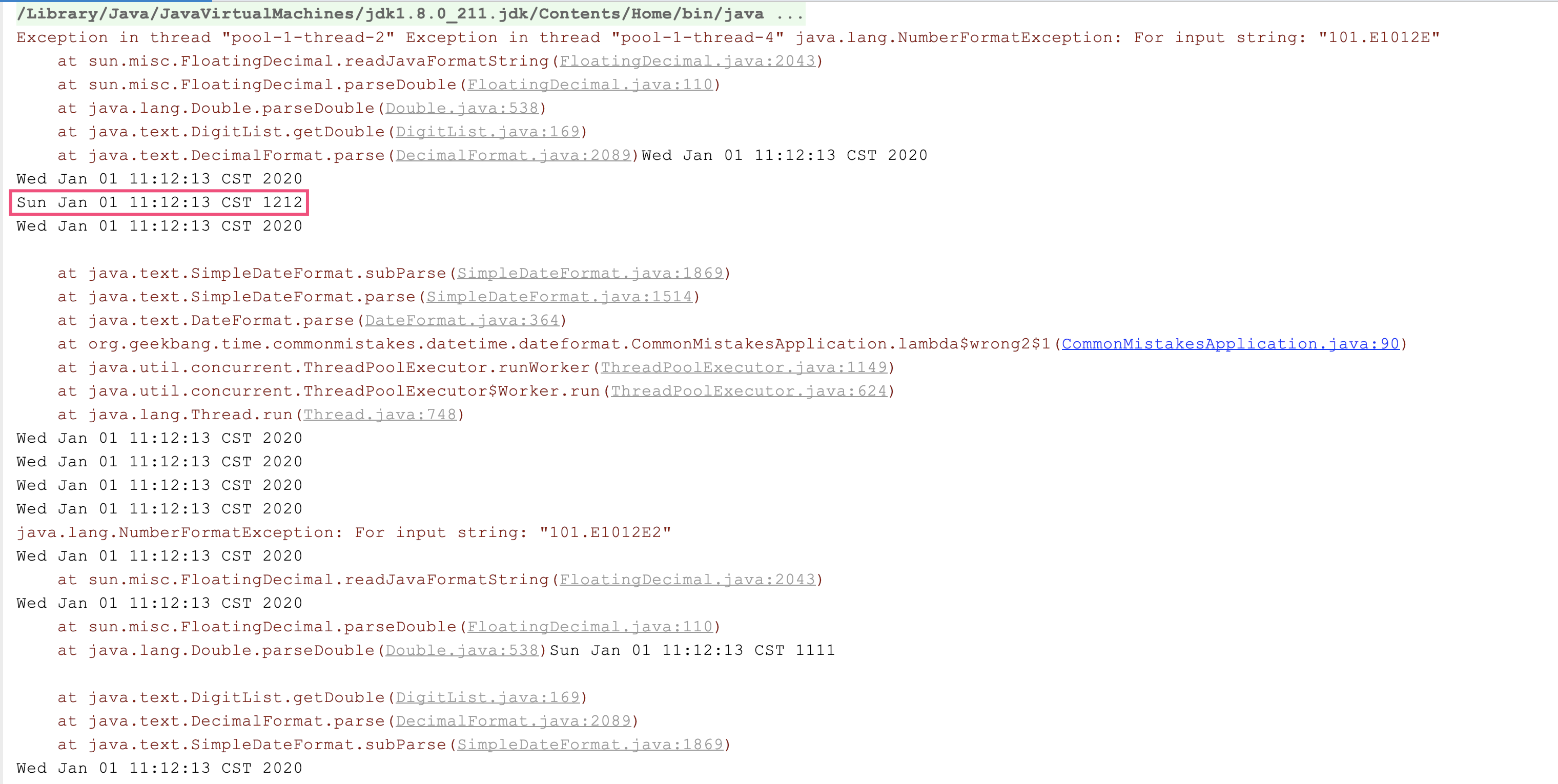
|
||
|
||
SimpleDateFormat的作用是定义解析和格式化日期时间的模式。这,看起来这是一次性的工作,应该复用,但它的解析和格式化操作是非线程安全的。我们来分析一下相关源码:
|
||
|
||
* SimpleDateFormat继承了DateFormat,DateFormat有一个字段Calendar;
|
||
* SimpleDateFormat的parse方法调用CalendarBuilder的establish方法,来构建Calendar;
|
||
* establish方法内部先清空Calendar再构建Calendar,整个操作没有加锁。
|
||
|
||
显然,如果多线程池调用parse方法,也就意味着多线程在并发操作一个Calendar,可能会产生一个线程还没来得及处理Calendar就被另一个线程清空了的情况:
|
||
|
||
```
|
||
public abstract class DateFormat extends Format {
|
||
protected Calendar calendar;
|
||
}
|
||
public class SimpleDateFormat extends DateFormat {
|
||
@Override
|
||
public Date parse(String text, ParsePosition pos)
|
||
{
|
||
CalendarBuilder calb = new CalendarBuilder();
|
||
parsedDate = calb.establish(calendar).getTime();
|
||
return parsedDate;
|
||
}
|
||
}
|
||
|
||
class CalendarBuilder {
|
||
Calendar establish(Calendar cal) {
|
||
...
|
||
cal.clear();//清空
|
||
|
||
for (int stamp = MINIMUM_USER_STAMP; stamp < nextStamp; stamp++) {
|
||
for (int index = 0; index <= maxFieldIndex; index++) {
|
||
if (field[index] == stamp) {
|
||
cal.set(index, field[MAX_FIELD + index]);//构建
|
||
break;
|
||
}
|
||
}
|
||
}
|
||
return cal;
|
||
}
|
||
}
|
||
|
||
```
|
||
|
||
format方法也类似,你可以自己分析。因此只能在同一个线程复用SimpleDateFormat,比较好的解决方式是,通过ThreadLocal来存放SimpleDateFormat:
|
||
|
||
```
|
||
private static ThreadLocal<SimpleDateFormat> threadSafeSimpleDateFormat = ThreadLocal.withInitial(() -> new SimpleDateFormat("yyyy-MM-dd HH:mm:ss"));
|
||
|
||
```
|
||
|
||
第二个坑是,**当需要解析的字符串和格式不匹配的时候,SimpleDateFormat表现得很宽容**,还是能得到结果。比如,我们期望使用yyyyMM来解析20160901字符串:
|
||
|
||
```
|
||
String dateString = "20160901";
|
||
SimpleDateFormat dateFormat = new SimpleDateFormat("yyyyMM");
|
||
System.out.println("result:" + dateFormat.parse(dateString));
|
||
|
||
```
|
||
|
||
居然输出了2091年1月1日,原因是把0901当成了月份,相当于75年:
|
||
|
||
```
|
||
result:Mon Jan 01 00:00:00 CST 2091
|
||
|
||
```
|
||
|
||
对于SimpleDateFormat的这三个坑,我们使用Java 8中的DateTimeFormatter就可以避过去。首先,使用DateTimeFormatterBuilder来定义格式化字符串,不用去记忆使用大写的Y还是小写的Y,大写的M还是小写的m:
|
||
|
||
```
|
||
private static DateTimeFormatter dateTimeFormatter = new DateTimeFormatterBuilder()
|
||
.appendValue(ChronoField.YEAR) //年
|
||
.appendLiteral("/")
|
||
.appendValue(ChronoField.MONTH_OF_YEAR) //月
|
||
.appendLiteral("/")
|
||
.appendValue(ChronoField.DAY_OF_MONTH) //日
|
||
.appendLiteral(" ")
|
||
.appendValue(ChronoField.HOUR_OF_DAY) //时
|
||
.appendLiteral(":")
|
||
.appendValue(ChronoField.MINUTE_OF_HOUR) //分
|
||
.appendLiteral(":")
|
||
.appendValue(ChronoField.SECOND_OF_MINUTE) //秒
|
||
.appendLiteral(".")
|
||
.appendValue(ChronoField.MILLI_OF_SECOND) //毫秒
|
||
.toFormatter();
|
||
|
||
```
|
||
|
||
其次,DateTimeFormatter是线程安全的,可以定义为static使用;最后,DateTimeFormatter的解析比较严格,需要解析的字符串和格式不匹配时,会直接报错,而不会把0901解析为月份。我们测试一下:
|
||
|
||
```
|
||
//使用刚才定义的DateTimeFormatterBuilder构建的DateTimeFormatter来解析这个时间
|
||
LocalDateTime localDateTime = LocalDateTime.parse("2020/1/2 12:34:56.789", dateTimeFormatter);
|
||
//解析成功
|
||
System.out.println(localDateTime.format(dateTimeFormatter));
|
||
//使用yyyyMM格式解析20160901是否可以成功呢?
|
||
String dt = "20160901";
|
||
DateTimeFormatter dateTimeFormatter = DateTimeFormatter.ofPattern("yyyyMM");
|
||
System.out.println("result:" + dateTimeFormatter.parse(dt));
|
||
|
||
```
|
||
|
||
输出日志如下:
|
||
|
||
```
|
||
2020/1/2 12:34:56.789
|
||
Exception in thread "main" java.time.format.DateTimeParseException: Text '20160901' could not be parsed at index 0
|
||
at java.time.format.DateTimeFormatter.parseResolved0(DateTimeFormatter.java:1949)
|
||
at java.time.format.DateTimeFormatter.parse(DateTimeFormatter.java:1777)
|
||
at org.geekbang.time.commonmistakes.datetime.dateformat.CommonMistakesApplication.better(CommonMistakesApplication.java:80)
|
||
at org.geekbang.time.commonmistakes.datetime.dateformat.CommonMistakesApplication.main(CommonMistakesApplication.java:41)
|
||
|
||
```
|
||
|
||
到这里我们可以发现,使用Java 8中的DateTimeFormatter进行日期时间的格式化和解析,显然更让人放心。那么,对于日期时间的运算,使用Java 8中的日期时间类会不会更简单呢?
|
||
|
||
## 日期时间的计算
|
||
|
||
关于日期时间的计算,我先和你说一个常踩的坑。有些同学喜欢直接使用时间戳进行时间计算,比如希望得到当前时间之后30天的时间,会这么写代码:直接把new Date().getTime方法得到的时间戳加30天对应的毫秒数,也就是30天\*1000毫秒\*3600秒\*24小时:
|
||
|
||
```
|
||
Date today = new Date();
|
||
Date nextMonth = new Date(today.getTime() + 30 * 1000 * 60 * 60 * 24);
|
||
System.out.println(today);
|
||
System.out.println(nextMonth);
|
||
|
||
```
|
||
|
||
得到的日期居然比当前日期还要早,根本不是晚30天的时间:
|
||
|
||
```
|
||
Sat Feb 01 14:17:41 CST 2020
|
||
Sun Jan 12 21:14:54 CST 2020
|
||
|
||
```
|
||
|
||
出现这个问题,**其实是因为int发生了溢出**。修复方式就是把30改为30L,让其成为一个long:
|
||
|
||
```
|
||
Date today = new Date();
|
||
Date nextMonth = new Date(today.getTime() + 30L * 1000 * 60 * 60 * 24);
|
||
System.out.println(today);
|
||
System.out.println(nextMonth);
|
||
|
||
```
|
||
|
||
这样就可以得到正确结果了:
|
||
|
||
```
|
||
Sat Feb 01 14:17:41 CST 2020
|
||
Mon Mar 02 14:17:41 CST 2020
|
||
|
||
```
|
||
|
||
不难发现,手动在时间戳上进行计算操作的方式非常容易出错。对于Java 8之前的代码,我更建议使用Calendar:
|
||
|
||
```
|
||
Calendar c = Calendar.getInstance();
|
||
c.setTime(new Date());
|
||
c.add(Calendar.DAY_OF_MONTH, 30);
|
||
System.out.println(c.getTime());
|
||
|
||
```
|
||
|
||
使用Java 8的日期时间类型,可以直接进行各种计算,更加简洁和方便:
|
||
|
||
```
|
||
LocalDateTime localDateTime = LocalDateTime.now();
|
||
System.out.println(localDateTime.plusDays(30));
|
||
|
||
```
|
||
|
||
并且,**对日期时间做计算操作,Java 8日期时间API会比Calendar功能强大很多**。
|
||
|
||
第一,可以使用各种minus和plus方法直接对日期进行加减操作,比如如下代码实现了减一天和加一天,以及减一个月和加一个月:
|
||
|
||
```
|
||
System.out.println("//测试操作日期");
|
||
System.out.println(LocalDate.now()
|
||
.minus(Period.ofDays(1))
|
||
.plus(1, ChronoUnit.DAYS)
|
||
.minusMonths(1)
|
||
.plus(Period.ofMonths(1)));
|
||
|
||
```
|
||
|
||
可以得到:
|
||
|
||
```
|
||
//测试操作日期
|
||
2020-02-01
|
||
|
||
```
|
||
|
||
第二,还可以通过with方法进行快捷时间调节,比如:
|
||
|
||
* 使用TemporalAdjusters.firstDayOfMonth得到当前月的第一天;
|
||
* 使用TemporalAdjusters.firstDayOfYear()得到当前年的第一天;
|
||
* 使用TemporalAdjusters.previous(DayOfWeek.SATURDAY)得到上一个周六;
|
||
* 使用TemporalAdjusters.lastInMonth(DayOfWeek.FRIDAY)得到本月最后一个周五。
|
||
|
||
```
|
||
System.out.println("//本月的第一天");
|
||
System.out.println(LocalDate.now().with(TemporalAdjusters.firstDayOfMonth()));
|
||
|
||
System.out.println("//今年的程序员日");
|
||
System.out.println(LocalDate.now().with(TemporalAdjusters.firstDayOfYear()).plusDays(255));
|
||
|
||
System.out.println("//今天之前的一个周六");
|
||
System.out.println(LocalDate.now().with(TemporalAdjusters.previous(DayOfWeek.SATURDAY)));
|
||
|
||
System.out.println("//本月最后一个工作日");
|
||
System.out.println(LocalDate.now().with(TemporalAdjusters.lastInMonth(DayOfWeek.FRIDAY)));
|
||
|
||
```
|
||
|
||
输出如下:
|
||
|
||
```
|
||
//本月的第一天
|
||
2020-02-01
|
||
//今年的程序员日
|
||
2020-09-12
|
||
//今天之前的一个周六
|
||
2020-01-25
|
||
//本月最后一个工作日
|
||
2020-02-28
|
||
|
||
```
|
||
|
||
第三,可以直接使用lambda表达式进行自定义的时间调整。比如,为当前时间增加100天以内的随机天数:
|
||
|
||
```
|
||
System.out.println(LocalDate.now().with(temporal -> temporal.plus(ThreadLocalRandom.current().nextInt(100), ChronoUnit.DAYS)));
|
||
|
||
```
|
||
|
||
得到:
|
||
|
||
```
|
||
2020-03-15
|
||
|
||
```
|
||
|
||
除了计算外,还可以判断日期是否符合某个条件。比如,自定义函数,判断指定日期是否是家庭成员的生日:
|
||
|
||
```
|
||
public static Boolean isFamilyBirthday(TemporalAccessor date) {
|
||
int month = date.get(MONTH_OF_YEAR);
|
||
int day = date.get(DAY_OF_MONTH);
|
||
if (month == Month.FEBRUARY.getValue() && day == 17)
|
||
return Boolean.TRUE;
|
||
if (month == Month.SEPTEMBER.getValue() && day == 21)
|
||
return Boolean.TRUE;
|
||
if (month == Month.MAY.getValue() && day == 22)
|
||
return Boolean.TRUE;
|
||
return Boolean.FALSE;
|
||
}
|
||
|
||
```
|
||
|
||
然后,使用query方法查询是否匹配条件:
|
||
|
||
```
|
||
System.out.println("//查询是否是今天要举办生日");
|
||
System.out.println(LocalDate.now().query(CommonMistakesApplication::isFamilyBirthday));
|
||
|
||
```
|
||
|
||
使用Java 8操作和计算日期时间虽然方便,但计算两个日期差时可能会踩坑:**Java 8中有一个专门的类Period定义了日期间隔,通过Period.between得到了两个LocalDate的差,返回的是两个日期差几年零几月零几天。如果希望得知两个日期之间差几天,直接调用Period的getDays()方法得到的只是最后的“零几天”,而不是算总的间隔天数**。
|
||
|
||
比如,计算2019年12月12日和2019年10月1日的日期间隔,很明显日期差是2个月零11天,但获取getDays方法得到的结果只是11天,而不是72天:
|
||
|
||
```
|
||
System.out.println("//计算日期差");
|
||
LocalDate today = LocalDate.of(2019, 12, 12);
|
||
LocalDate specifyDate = LocalDate.of(2019, 10, 1);
|
||
System.out.println(Period.between(specifyDate, today).getDays());
|
||
System.out.println(Period.between(specifyDate, today));
|
||
System.out.println(ChronoUnit.DAYS.between(specifyDate, today));
|
||
|
||
```
|
||
|
||
可以使用ChronoUnit.DAYS.between解决这个问题:
|
||
|
||
```
|
||
//计算日期差
|
||
11
|
||
P2M11D
|
||
72
|
||
|
||
```
|
||
|
||
从日期时间的时区到格式化再到计算,你是不是体会到Java 8日期时间类的强大了呢?
|
||
|
||
## 重点回顾
|
||
|
||
今天,我和你一起看了日期时间的初始化、时区、格式化、解析和计算的问题。我们看到,使用Java 8中的日期时间包Java.time的类进行各种操作,会比使用遗留的Date、Calender和SimpleDateFormat更简单、清晰,功能也更丰富、坑也比较少。
|
||
|
||
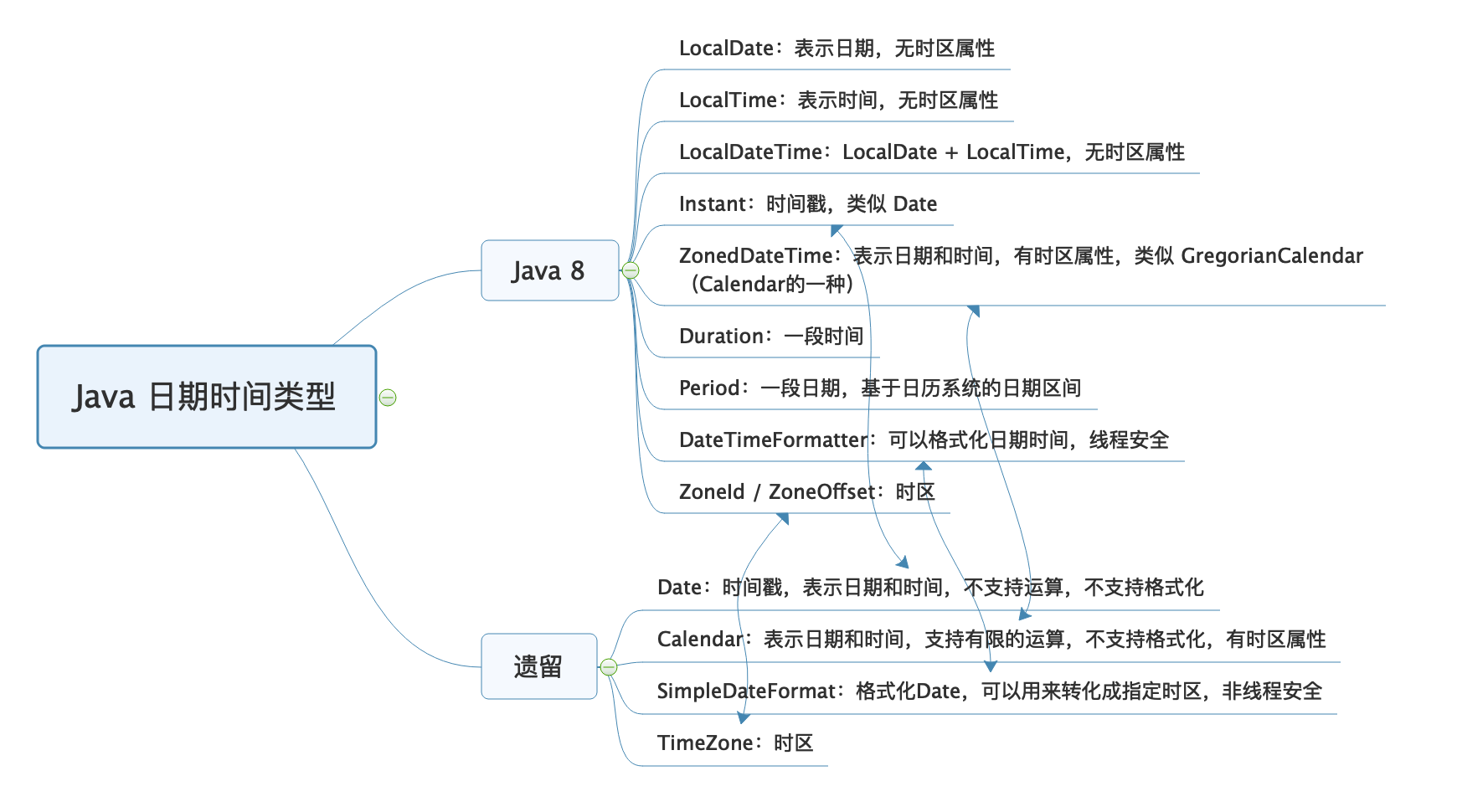
如果有条件的话,我还是建议全面改为使用Java 8的日期时间类型。我把Java 8前后的日期时间类型,汇总到了一张思维导图上,图中箭头代表的是新老类型在概念上等价的类型:
|
||
|
||
|
||
|
||
这里有个误区是,认为java.util.Date类似于新API中的LocalDateTime。其实不是,虽然它们都没有时区概念,但java.util.Date类是因为使用UTC表示,所以没有时区概念,其本质是时间戳;而LocalDateTime,严格上可以认为是一个日期时间的表示,而不是一个时间点。
|
||
|
||
因此,在把Date转换为LocalDateTime的时候,需要通过Date的toInstant方法得到一个UTC时间戳进行转换,并需要提供当前的时区,这样才能把UTC时间转换为本地日期时间(的表示)。反过来,把LocalDateTime的时间表示转换为Date时,也需要提供时区,用于指定是哪个时区的时间表示,也就是先通过atZone方法把LocalDateTime转换为ZonedDateTime,然后才能获得UTC时间戳:
|
||
|
||
```
|
||
Date in = new Date();
|
||
LocalDateTime ldt = LocalDateTime.ofInstant(in.toInstant(), ZoneId.systemDefault());
|
||
Date out = Date.from(ldt.atZone(ZoneId.systemDefault()).toInstant());
|
||
|
||
```
|
||
|
||
很多同学说使用新API很麻烦,还需要考虑时区的概念,一点都不简洁。但我通过这篇文章要和你说的是,并不是因为API需要设计得这么繁琐,而是UTC时间要变为当地时间,必须考虑时区。
|
||
|
||
今天用到的代码,我都放在了GitHub上,你可以点击[这个链接](https://github.com/JosephZhu1983/java-common-mistakes)查看。
|
||
|
||
## 思考与讨论
|
||
|
||
1. 我今天多次强调Date是一个时间戳,是UTC时间、没有时区概念,为什么调用其toString方法会输出类似CST之类的时区字样呢?
|
||
2. 日期时间数据始终要保存到数据库中,MySQL中有两种数据类型datetime和timestamp可以用来保存日期时间。你能说说它们的区别吗,它们是否包含时区信息呢?
|
||
|
||
对于日期和时间,你还遇到过什么坑吗?我是朱晔,欢迎在评论区与我留言分享你的想法,也欢迎你把今天的内容分享给你的朋友或同事,一起交流。
|
||
|